Key points
- Grid-connected solar panels switch off in a blackout, even on a sunny day. That’s a safety rule, not a fault.
- A battery only keeps your power on if it’s installed with backup: a backup circuit or a gateway that disconnects your home from the grid.
- Most homes back up essential circuits (fridge, lights, internet, some power points), not the whole house.
- Switchover ranges from about 0–10 milliseconds on some systems (manufacturer figures) to a few minutes on others.
- Not every system lets solar recharge the battery during an outage. Ask before you buy.
Will a solar battery work in a blackout? Yes, but only if it was installed with backup power, and only for the circuits it was wired to cover. Solar battery backup in a blackout depends on the inverter, a backup circuit or gateway, and how much charge is left in the battery when the grid drops out. Many people are surprised to find their solar stops working in an outage, so here’s how backup really works in South Australia and Victoria, and what to ask before you sign a quote.
Why do solar panels stop working in a blackout?
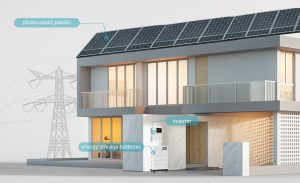
A standard grid-connected solar inverter is designed to shut down within moments of the grid going down. This is called anti-islanding. It stops your system sending power into the street while line workers are repairing it. Inverters in Australia must meet AS/NZS 4777.2, which allows a home to keep running on its own power only when the system is specifically designed to disconnect from the grid first.
So a solar-only system gives you nothing during an outage, even at midday. To keep the lights on you need storage plus equipment that can safely “island” your home: separate it from the grid, then power it from the battery. This guide is part of our home solar battery guide for SA and Victoria.
What are the different types of solar battery backup?
| Backup level | What keeps running | Typical setup | Trade-offs |
|---|---|---|---|
| No backup | Nothing; the battery sits idle until the grid returns | Battery installed for bill savings only | Cheapest; no protection from outages |
| Essential circuits (partial) | Fridge, lights, internet, selected power points, maybe a small air conditioner | Backup (EPS) output on a hybrid inverter feeding a separate sub-board | Affordable and common; you choose the circuits in advance |
| Whole-home backup | Most or all circuits, within the inverter’s power limit | Gateway or backup switch at the main switchboard | Most convenient; costs more, and big loads can still overload it |
Essential-circuit backup suits most homes. SolarQuotes suggests a typical list of the fridge, lights, a few sockets including the internet router, and perhaps a small air conditioner. Whole-home backup sounds better but it doesn’t give you more energy, only access to more circuits. A ducted air conditioner, oven and electric hot water running together can exceed what the battery inverter can supply and trip the backup.
Tip: Backup is limited by power (kW) as well as energy (kWh). A 13.5 kWh battery can run a fridge for days, but if its inverter can only deliver around 5 kW, it can’t run an oven, kettle and air conditioner at the same time.
How quickly does battery backup switch on?
Switchover time varies by system. SolarQuotes says it ranges from milliseconds to a few minutes. Some examples from Australian manufacturer documents:
- Sungrow SH-RS hybrid inverters: the Australian datasheet for the SH8.0RS and SH10RS lists a backup switch time under 10 ms, a built-in 63 A bypass for full-house backup, and 8–10 kW of rated off-grid output.
- Sigenergy Gateway: Australian datasheets list a 0 ms disruption time, measured on the load side and assuming the backup load is within the gateway’s rating. SolarQuotes notes it hasn’t independently verified the claim.
- Tesla Powerwall 3: installed with Backup Gateway 2 in Australia, which detects the outage, disconnects from the grid and provides backup power.
A switchover of a few milliseconds is fast enough that most appliances and computers won’t notice. A slower switch means clocks reset and desktop computers restart, but your fridge and lights will come back. If you work from home, ask your installer for the switchover time of the exact model they’re quoting. Our 2026 home battery brands comparison covers each brand’s backup options in more detail.
Can solar recharge the battery during a blackout?
It depends on how the system is wired. With a hybrid inverter (solar and battery on one DC-coupled inverter), the panels can usually keep charging the battery and running backed-up loads during a long outage. With an AC-coupled battery added to an existing solar system, the solar inverter must be on the backed-up side and able to synchronise with the battery’s island. Some setups manage this; others don’t.
SolarQuotes warns that some systems cut off solar charging during an outage. Energy Matters notes that some AC-coupled systems struggle with a “black start”, where a flat battery needs morning sun to restart without a grid signal. If you’re adding storage to an older system, our guide to adding a battery to existing solar explains AC and DC coupling.
How long will a battery run my home in a blackout?
That depends on how full the battery is and what you run. Here’s an illustrative essential load over 24 hours. Check your own appliances’ labels for real figures.
| Appliance (example) | Approximate use | Energy over 24 hours |
|---|---|---|
| Fridge-freezer (energy label ~400 kWh/yr) | Runs on and off all day | ~1.1 kWh |
| LED lights (8 x 10 W) | 5 hours in the evening | ~0.4 kWh |
| Modem, router and phone charging | ~20 W all day | ~0.5 kWh |
| TV (100 W) | 4 hours | ~0.4 kWh |
| Small split-system air conditioner (~1 kW draw) | 4 hours | ~4 kWh |
| Total | ~6.4 kWh |
A 13.5 kWh battery that starts at 80% (about 10.8 kWh) could run that load for well over a day before reaching a 20% reserve, longer if the sun recharges it. Without the air conditioner, the same battery could cover essentials for several days. If backup is a priority, it can change the size you choose; see what size solar battery you need.
How common are blackouts in SA and Victoria?
Most outages are short and local: a car hits a pole, a tree falls on a line, or the network does planned maintenance. But both states have had major events. On 28 September 2016, tornadoes knocked over transmission towers and South Australia went into a statewide “black system” affecting about 850,000 customers (AEMO). On 13 February 2024, storms in Victoria brought down six 500 kV transmission towers and AEMO reported about 530,000 homes and businesses off supply at the peak. The state government’s network outage review found some properties waited 11 days for reconnection.
Events like these are why more SA and VIC households now ask for backup when they add a battery.
How to get battery backup set up properly
- Decide what must stay on. List the circuits you need: fridge, lights, internet, a medical device charger, a bedroom air conditioner. Your installer wires these to the backup side.
- Keep a backup reserve. SolarQuotes suggests keeping 10–30% in the battery. If you join a VPP, check its minimum reserve; most keep around 20%.
- Use storm mode if you have it. Tesla’s Storm Watch charges the Powerwall to full ahead of severe weather warnings. Other brands offer similar settings in their apps.
- Ask about solar during outages. Confirm in writing that your panels will recharge the battery when the grid is down.
- Use a compliant installer. Backup wiring must meet the wiring rules and the battery standard AS/NZS 5139. Never back-feed a home with a portable generator through a power point.
- Life support. If anyone in your home relies on life-support equipment, stay registered with your retailer and distributor and keep a backup plan that doesn’t rely only on a battery.
Battery backup won’t help if the problem is your own system. If your solar or battery stops working on a normal day, see common solar problems and what to do.
Frequently asked questions
Does solar work during a power outage without a battery?
No. Grid-connected solar inverters shut down automatically when the grid fails, to protect line workers. This happens even on a sunny day. To use your solar during an outage you need a battery and an inverter or gateway designed to disconnect your home from the grid and run it as a safe island.
Can I add backup to a battery I already have?
Often, yes. Many hybrid inverters have a backup output that isn’t connected when the battery goes in for bill savings only. An electrician can add a backup sub-board, or a gateway for whole-home backup, depending on the model. Ask your installer what your inverter supports and what the switchboard work would involve before you assume it can be done.
Will my battery run ducted air conditioning in a blackout?
Usually not for long, and sometimes not at all. Ducted systems can draw several kilowatts and have high start-up loads that may exceed the battery inverter’s backup output. A small split system on a backup circuit is more realistic. If cooling during outages matters, discuss inverter output in kW with your installer, not just battery capacity.
How long does a home battery last during a blackout?
It depends on your battery’s charge and what you run. Essentials like a fridge, lights and internet use roughly 2–3 kWh a day, so a 13.5 kWh battery could cover them for several days, longer if the panels can recharge it. Running air conditioning or cooking appliances will drain it much faster.
Want a battery that keeps the essentials running when the grid goes down? Our installers in Adelaide and Melbourne design backup to suit your switchboard and the circuits you care about. See our solar battery system installation options or get a free quote.
Sources: SolarQuotes – Battery backup (updated 12 Oct 2026); Sungrow – SH8.0/10RS datasheet (AU) (2023); Energy Matters – AC vs DC coupled batteries (17 Mar 2026); AEMO – Black system South Australia 28 September 2016, final report (Mar 2017); AEMO – Power system event in Victoria (Feb 2024); Premier of Victoria – Network Outage Review (Sep 2024). Switchover times are manufacturer figures; confirm the specification for your exact model. Featured image: W.carter / Wikimedia Commons, CC BY-SA 4.0.