Key points
- Most “solar not working” calls come down to a tripped switch, a grid outage, high grid voltage, export limits or a lost Wi-Fi connection, not broken panels.
- You can safely check the inverter display, your monitoring app and the switchboard. Never open the inverter or touch DC isolators, cables or panels.
- Panels stay live whenever there’s daylight, even with the mains switched off. Only a licensed electrician should work on them.
- Burning smells, scorch marks, buzzing or smoke: follow the shutdown label at your switchboard or inverter, keep clear and call an electrician (or 000 if there’s fire).
Solar not working? Start with the simple, safe checks: is the inverter showing a fault, has a switch tripped at the switchboard, is there a power outage, or has your monitoring app just lost its Wi-Fi? Those four account for a large share of problems. This guide runs through the 10 most common causes we see in Adelaide and Melbourne homes, what you can safely check yourself, and when to hand over to a licensed electrician.
First: stay safe
A solar system is a live electrical system. The federal Solar Consumer Guide warns that even if your mains are switched off, your solar panels are still energised and could cause electric shock or electrocution. Panels produce dangerous DC voltage whenever light hits them, and there’s no switch on the roof that makes the panels themselves safe.
- Do look at the inverter screen, check your app and look at the switchboard.
- Do follow the shutdown procedure on the label at your switchboard or next to the inverter if you need to turn the system off. Australian product safety regulators note you don’t need an electrician to shut a system down this way, but you should ask your solar company for help if you’re unsure.
- Don’t open the inverter, remove covers, touch DC isolators or plugs, or go onto the roof.
- Don’t keep resetting a breaker that trips again. That’s a sign of a fault.
Most shutdown labels tell you to turn off the AC solar supply main switch first, then the DC isolator at the inverter, and to restart in the reverse order. Always follow the label on your own system, because designs vary. For the bigger picture on servicing and repairs, see our complete solar maintenance and repairs guide.
Quick diagnosis table
| Symptom | Likely cause | Safe first step |
|---|---|---|
| Inverter screen blank, no lights | Tripped solar main switch or breaker, AC supply off | Check the switchboard; reset once only |
| Inverter says “no grid” or “grid lost” | Power outage or supply fault | Check whether the house has power; check with your network |
| Output drops or cuts out on sunny middays | High grid voltage or export limiting | Note the voltage reading and times in your app |
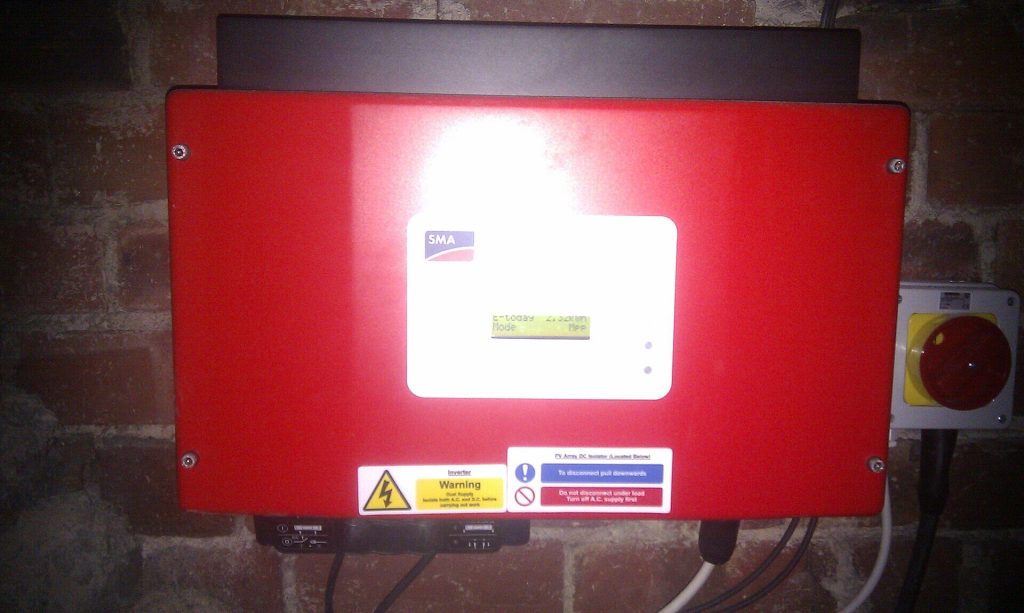
| Red light or fault message | Inverter fault (insulation, earth, overheating) | Photograph the code; call your installer |
| App shows zero but inverter shows output | Wi-Fi or monitoring dropout | Reconnect the inverter to Wi-Fi |
| Output about a third or half lower than usual | One string offline, shading or soiling | Compare with the same weather last year |
Solar not working? 10 common causes
1. It’s working, but conditions are poor
A cloudy week or mid-winter can make a healthy system look broken. In Melbourne, a clear summer day can produce two to three times as much as a clear mid-winter day. Compare like with like: a sunny day this month against a sunny day in the same month last year. New shade from a growing tree or a neighbour’s extension is another quiet output killer.
2. The solar main switch or a breaker has tripped
Your switchboard has a switch labelled something like “Solar Supply Main Switch” or “Inverter Supply”. If it, or an RCD (safety switch) on that circuit, has tripped, the inverter goes dark. It’s reasonable to reset it once. If it trips again, leave it off and call an electrician, because something is causing it.
3. There’s a blackout or supply fault
Grid-connected inverters must shut down when the grid goes down. This “anti-islanding” protection stops your system sending power into lines that line workers believe are dead. Solar alone won’t run your home in a blackout unless you have a battery with backup. Our guide to solar battery backup in a blackout explains the options. If only your home has lost power, contact your electricity distributor (SA Power Networks in SA; CitiPower, Powercor, Jemena, United Energy or AusNet in Victoria).
4. Grid voltage is too high
This is very common on sunny days in streets with lots of solar. Inverters must reduce output or disconnect when voltage climbs. Under the inverter standard AS/NZS 4777.2:2020, an inverter must disconnect if the 10-minute average voltage exceeds 258 V. SA Power Networks says the network should supply no more than 253 V at your service point.
SA Power Networks recommends first having your installer or an electrician confirm your inverter uses the mandatory settings, not factory defaults. If the settings are right and your inverter is recording voltage above 258 V, contact your distributor. SAPN will ask for written proof of your settings, and network monitoring can take around three months.
5. Export limits or remote curtailment
Many systems are set to limit how much they send to the grid, so output can look “capped” at midday. In SA, new and upgraded systems must be able to be remotely turned down under the Smarter Homes rules, and flexible export limits vary through the day. Victoria has had a similar emergency backstop for new and upgraded systems since 1 October 2024. These events are rare and short, but they’re not a fault. See SA Power Networks flexible exports and the solar backstop for how this works.
6. The inverter is showing a fault code
Fault names differ between brands, but the common groups are:
- Insulation or isolation fault: the inverter has detected a leak from the DC wiring to earth. Moisture in a rooftop isolator or a damaged cable are typical causes. This needs an electrician.
- Earth or residual current fault: similar, and also an electrician job.
- Over-temperature or derating: inverters in direct afternoon sun or with blocked vents throttle themselves. Keep vents clear; don’t cover the unit.
- Grid voltage or frequency out of range: see point 4.
- Internal or hardware fault: the inverter itself may be failing.
Photograph the screen or note the code and time, then contact your installer or the manufacturer. Don’t power-cycle repeatedly. If the unit is out of warranty or keeps failing, read when to replace a solar inverter.
7. A DC isolator has failed or been switched off
Many systems installed before the 2021 update to the wiring standard have DC isolators on the roof next to the panels. Energy Safe Victoria says components like wiring, switches and isolators deteriorate with weather exposure, and its earlier audits identified moisture in DC isolators as a major cause of solar fires. If an isolator is off, damaged, discoloured or the inverter reports an insulation fault, don’t touch it. Book a licensed electrician.
8. The monitoring has dropped out, not the solar
A new modem, a changed Wi-Fi password or weak signal in the garage will make your app show zero. If the inverter screen shows it’s producing power, the system is probably fine. Reconnect it using the manufacturer’s instructions. Our solar monitoring guide covers this and what normal output looks like.
9. Panel, string or connector problems
If output suddenly drops by about a third or a half on sunny days, one string of panels may be offline. Causes include a failed connector, a damaged cable (sometimes chewed by rodents or cockatoos), a cracked panel after hail, or a fault in a microinverter or optimiser. Gradual losses are more often dirt, droppings or shade. See when solar panels need cleaning and bird-proofing solar panels. Anything involving cables or panels is an electrician job.
10. Your bill says it isn’t working, but it is
Sometimes the solar is fine and the problem is metering or billing. After a meter change or retailer switch, exports can be misread or credited at a new, lower feed-in tariff. Check your smart meter data in your retailer’s portal against your inverter’s daily total. If they don’t line up, raise it with your retailer first, then the energy ombudsman in your state.
When to call a licensed electrician
Call your installer or a licensed electrician if:
- a breaker or safety switch trips again after one reset
- the inverter shows an insulation, earth or hardware fault
- you see scorch marks, melted plastic, water inside an isolator or damaged cables
- output stays well below normal on clear days for more than a week
- you smell burning or hear buzzing or crackling from any solar component.
If anything is smoking or on fire, call 000 and tell the operator you have rooftop solar. The Solar Consumer Guide says your first contact should be your retailer or installer, and repairs under warranty should be free. If your installer has closed down, a different licensed electrician can still diagnose and repair the system. In Victoria, check their licence on Energy Safe Victoria’s public register and ask for a Certificate of Electrical Safety for wiring work.
How to stop problems coming back
Most faults give warning signs first. Check your app weekly, book a professional service at least every two years (Energy Safe Victoria’s recommendation), keep the inverter shaded and its vents clear, and fix bird or vegetation problems early. A service should include checking cables, isolators and the inverter’s fault history, which catches most issues before they stop your system.
Frequently asked questions
Why is my solar inverter not working after a power outage?
Inverters wait for the grid to return to stable voltage and frequency before reconnecting, which usually takes a few minutes. If the screen is still blank after power returns, the solar supply main switch or a breaker may have tripped. Reset it once. If it trips again or the inverter shows a fault, call a licensed electrician.
Can I reset my solar inverter myself?
You can turn the system off and on using the shutdown procedure on the label at your switchboard or inverter, which is designed for owners to use. Don’t open the inverter, unplug DC cables or touch isolators beyond what the label says. If the same fault returns after a restart, it needs professional diagnosis rather than repeated resets.
Why does my solar keep turning off on sunny days?
The most common cause is high grid voltage. When many homes export at midday, voltage rises, and inverters must reduce output or disconnect above set limits. Ask your installer to confirm your inverter has the mandatory network settings. If it does and voltage still exceeds 258 V, report it to your electricity distributor.
Is it dangerous if my solar system is not working?
Usually not. Most stoppages are protective shutdowns, tripped switches or communication dropouts. It becomes a safety issue if you notice burning smells, scorch marks, smoke, buzzing, water inside an isolator or damaged cables. In those cases, follow the shutdown label if safe, keep clear and call a licensed electrician or 000.
If you’ve worked through the checks and your solar is still not working, our licensed team in Adelaide and Melbourne can diagnose faults, repair wiring and isolators, and replace failed inverters or panels. Explore our residential solar services or contact us to book a solar repair.
Sources: energy.gov.au Solar Consumer Guide – Look after your solar system (accessed Oct 2026); SA Power Networks – Solar inverter settings (accessed Oct 2026); Energy Safe Victoria – Campaign urges home solar owners to prioritise safety (22 Sep 2025); Product Safety Australia – DC isolator recall shutdown advice; Victorian Government – Emergency backstop customer factsheet (2024). General information only; always follow the shutdown label on your own system. Featured image: Simon Walker / Wikimedia Commons, CC BY-SA 2.0.